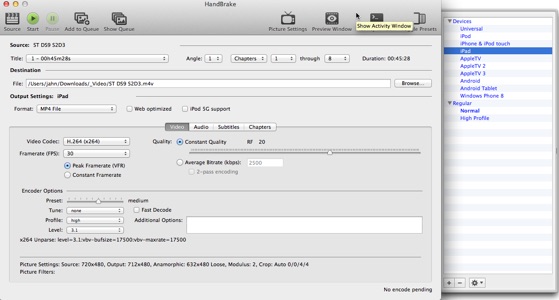
Handbrake v0.10.1 (2015)

I've talked about RipIt which is a one button DVD ripper. Great for archiving DVDs but you can only play them with a DVD player so not on an iPad. To do that you need to convert the DVD to movie files and for that I use Handbrake, a free open-source tool.
As you can see from the above image Handbrake does not have a simple UI and there are a lot of options for video formats and compression ratings and audio, subtitle and chapter info. And I believe the UI is a shell over some open source ripping libraries which are much harder to use.
But the saving grace are a bunch of presets on the right panel. I select iPad and it'll default to a good quality video that an iPad can play. There are other presets for iPod, iPhone, Apple TV, Android, Android Tablet and Windows Phone.
By default it tries to rip the longest title which works for movies but not tv shows. Because of that my workflow is something like this:
-
1.Use DVD Player to get the track number of the titles I want to rip. If there any specific non-default language or subtitle tracks I use DVD Player to find out which tracks those are.
-
2.In Handbrake I can say "rip title number x" to a file (using the episode as the file name).
-
3.The video options are setup just fine via the preset.
-
4.If you want a secondary audio track (e.g. commentary track) then go to Audio tab and add the track.
-
5.If you want a subtitle track then go to Subtitles and add the track. I use the CC track rather than VOBSUB and don't burn it in.
-
6.Click Add to Queue.
-
7.Repeat steps 2-6 for the other episodes on the DVD.
On my MacBookPro 2009 ripping speed is about 30 to 35 fps, so a bit over 2/3rds of running time. Once the rip is done I can drag the files to iTunes then edit them to be TV Shows and add them to my iPad.
Not the simplest workflow but works well for me. Anyways, Handbrake is a powerful utility that a novice can use because of the presets (I don't remember when they were added but back when I looked at v0.7.1 in June 2006 I don't believe it had presets so it was a bit of guesswork trying to find the optimum settings).
Monday, May 11, 2015